
President Simulator Power Meter: Popularity and Unlocks
The President Simulator power meter is a progression tracker in the PC release by Studio 14b that converts national popularity gains into tier unlocks, expanding your executive authority across ten 10% milestones from 0% to 100%.
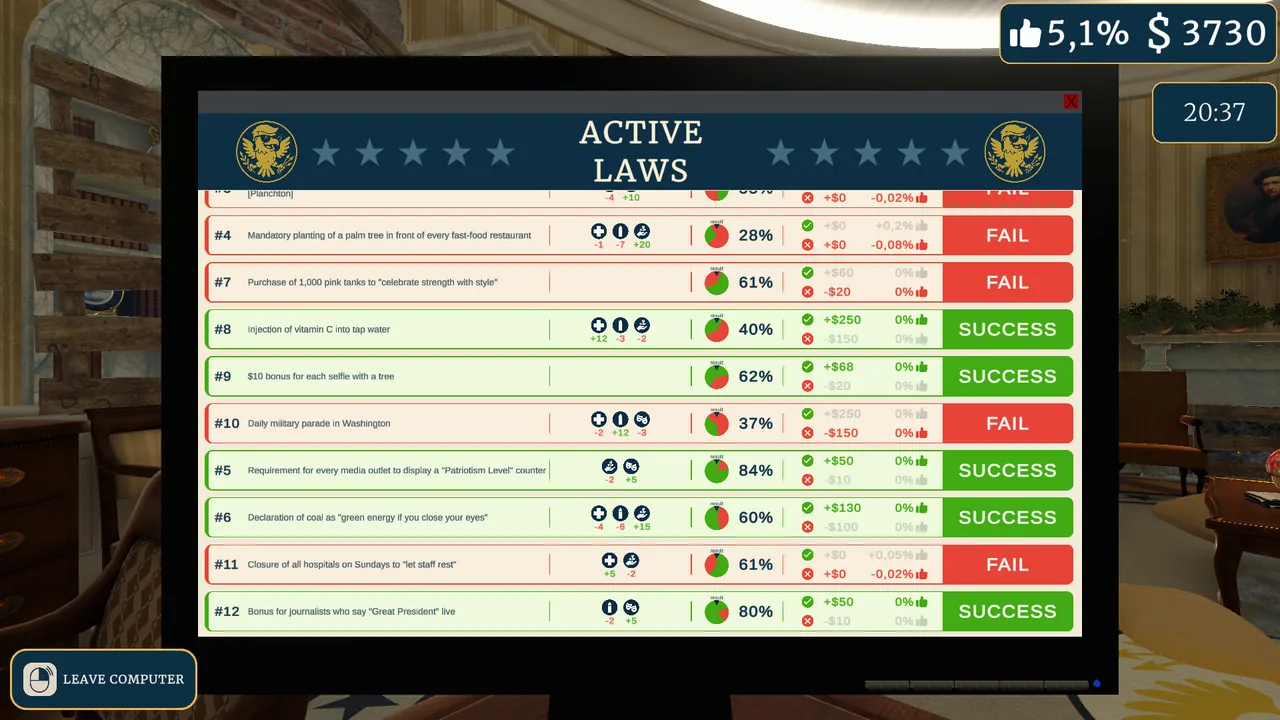
The President Simulator power meter is a progression tracker in the PC release by Studio 14b that converts national popularity gains into tier unlocks, expanding your executive authority across ten 10% milestones from 0% to 100%. The system operates directly through public approval earned by passing legislation and handling live media appearances.
In this satirical simulation, you take office with zero public standing. Every successful reform feeds into this meter, shifting your position from a rookie executive into a fully empowered leader.
What Is the President Simulator Power Meter?
The power meter is an executive unlock progression screen that tracks public approval percentage to reward additional mechanics. Official details published on the Steam store page outline this core relationship:
"The Power Meter: Gain popularity to unlock more power. The more the people love you, the more you can get away with... without (too many) consequences." — the developer's Steam announcement
The game begins at 0% popularity, where your administration operates under strict limitations. As documented in the promotional materials hosted by Games Press, legislative actions follow a high-stakes RNG mechanic where each decree carries a calculated success percentage. Passing decrees with favorable margins adds percentage points to the meter, while failed initiatives or out-of-control crises reduce your overall standing.
On the executive powers menu, the progression displays distinct milestones starting at early checkpoints such as 2% and continuing through ten percentage brackets: 10%, 20%, 30%, 40%, 50%, 60%, 70%, 80%, 90%, and 100%. Reaching these percentage benchmarks opens new capabilities in the Oval Office, including upgraded advisor interactions and larger legislative queues.
How Do You Increase Your Power Meter Rating?
Approval ratings are earned by successfully passing decrees and maintaining balanced policy meters. Daily governance runs from 9:00 AM to 9:00 PM, during which you review legislative paperwork delivered to your desk. Each signed bill must be moved to your advisor's workspace and processed on the office PC to roll for approval.
Maintaining meter stability directly prevents approval decay. Gameplay requires keeping three core administrative gauges within the green zone:
- Culture: Boosted by media quotas, nationalistic decrees, and arts initiatives, but excessive drift triggers crisis states.
- Justice: Maintained by civic rules, court regulations, and public registry mandates.
- Economy: Impacted by taxes, corporate subsidies, currency experiments, and local shopping incentives.
Allowing any category to push too far outside the safe green sector triggers an active crisis alert. During a crisis, specialized penalty modifiers activate, such as disabling all justice-related laws or cutting decree rewards, which halts your meter progression until resolved with emergency advisor proposals.
Beyond desk paperwork, reaching early approval marks unlocks active media management. Facing press conferences requires participating in timed input gauges to keep reporters satisfied, granting flat boosts to your public standing.
| Progress Stage | Unlock Requirements | Operational Cost |
|---|---|---|
| Early Administration (0% to 2%) | Passing initial daily decrees | High failure risk on low-chance decrees |
| Advisor Mobility Tier (2% Popularity) | 2% total power meter approval | Decrees processed across multi-step advisor tasks |
| High-Tier Milestones (10% to 100%) | Sustained bill streaks without crisis | Rebalancing policy meters to prevent severe stat decay |
Which Upgrades Unlock Through Power Meter Milestones?
Office upgrades are purchased using accumulated state funds once specific popularity gates are cleared. Earning capital occurs when approved decrees pay out their listed reward sums, with higher-risk laws offering payments between 125 and 900 dollars.
Clearing the initial 2% popularity barrier allows advisors to stand from their desks, enabling automated document carrying. Once active, staff members can transport signed paperwork directly to the review station. Additional executive upgrades unlocked through progressive milestones and fund investments include:
- Capacity expansions: Purchasing upgrades that allow you to hold an additional law at your desk simultaneously.
- Deck consistency: Upgrading your draft pool to increase the odds of drawing favorable laws during morning briefings.
- Advisor speed: Upgrades such as the Turbo Advisor perk, which shortens transit times between executive desks and allows staffers to carry multiple laws at once.
- Press incentives: Unlocking live conference bonuses where satisfied journalists reward larger popularity multipliers upon briefing completion.
Managing the power meter requires filtering out high-risk laws that threaten your justice or economic baselines. Sustained expansion across all ten brackets relies on balancing policy meters while saving reserve funds to resolve random crises before approval drops.
Where does this guide's official President Simulator information come from?
Official details in this guide follow President Simulator on Steam, which describes the game in its own words.
Become President of the USA: sign absurd decrees and balance your policies to avoid being called a "sellout." Communicate to gain popularity, manage interviews, and face press conferences. Everything falling apart? Press the red button.
President Simulator on Steam
Next step
Language Support
Check confirmed Steam languages for President Simulator alongside upcoming localization plans announced by developer Studio 14b.
Related Guides
President Simulator Interviews: Media Press and Questions; President Simulator Language Support on Steam; President Simulator Offline Play and Single-Player Setup
Interviews
Discover how interview mechanics work in President Simulator, how media questioning impacts popularity, and how to defend your legislative agenda.
Language Support
Check confirmed Steam languages for President Simulator alongside upcoming localization plans announced by developer Studio 14b.
Offline Play
Check offline play status, single-player session requirements, and Steam hardware setup details for President Simulator on Windows.